


Klede Plus
4.71.78K Reviews
App Specs
- Version
- 1.1.5
- Updated On
- License
- Free
- Downloads
- 100,000+
- Developer
- Zivsy
- Categories
- Entertainment
- Platform
- Android
Screenshots
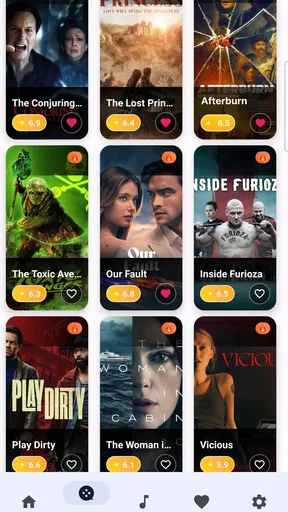


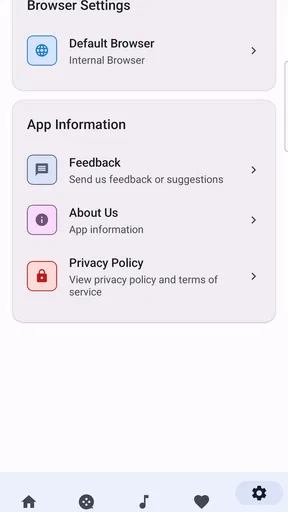

 Analysis by AppCompare
For a household that shares a device, a saved page can be useful only if everyone knows whose interests it belongs to. That is the practical question I would start with when considering Klede Plus: it is an entertainment app from Zivsy for keeping web pages of personal interest, rather than a wardrobe planner or a shared family organizer. I would treat it as a personal reading shelf and agree on simple boundaries before adding pages on a device other people use.
One device, different interests
Picture a family tablet used in the kitchen: one person wants to keep a recipe, another saves a guide for a weekend project, and a teenager wants to return to an article later. A collection of saved pages can help with that familiar problem of losing something useful in a crowded browser history. The benefit is less about coordinating a household and more about making individual interests easier to find again.
That distinction matters. I would not assume that one shared library automatically keeps each person’s pages separate, or that the app includes household profiles, shared lists, or parental controls. If people take turns using the same device, decide whether the library is communal or belongs to one person. For private reading, separate accounts or separate devices are a better boundary than relying on an arrangement the app has not established.
Setting expectations before saving
The habit that makes a web-page library useful is adding enough context to recognize why a page mattered. If you save a recipe, remember that it was for a particular meal; if you keep a how-to article, note the project it supports. Even without assuming any special tagging or note-taking tools, choosing deliberately what to save and revisiting the collection regularly can prevent it from becoming another pile of forgotten links.
For a shared tablet, I would also make a small routine: check that the page is appropriate for the next person to see, and avoid saving personal material to a library everyone can open. A teen rating is a useful age-context signal, but it does not replace a parent’s judgment about the content being saved or viewed. Anyone expecting automatic filtering should look for a different solution designed specifically for family safety.
Where it fits among familiar options
Compared with leaving pages in browser bookmarks, an interest library may feel more purposeful: it gives saved reading a place beyond the browser’s general history. Compared with sending links through a family chat, it can reduce the chance that a useful page gets buried under unrelated messages. Those are sensible reasons to try this kind of app, but they are not the same as shared task management or a synchronized household planner.
I would choose ordinary bookmarks when I only need a few permanent references in one browser. I would use a group chat when the main goal is to pass a page to another person and discuss it. Klede Plus makes more sense when the goal is to collect web pages around personal interests and return to them later. The trade-off is that a collection needs occasional housekeeping: saving everything feels productive at first, but makes the pages you actually want harder to spot.
Worth Reading Before You Choose

EA SPORTS FC Mobile 26 Is a Bigger Football Game, but It Takes Time

Flipboard Shows What News Apps Must Do Beyond the Feed

Switching to Android Auto Means Rethinking Your Driving Routine

Google Calendar Makes a Crowded Week Easier to Manage

Ludo King Makes the Most of the Minutes Between Plans

Baby Panda World Brings Quick Play to Modern Phones, but Its Game Library Feels Busy
Before relying on it for an important page, I would test the routine with something low-stakes: save a page, leave the app, and see whether I can find it again without searching through unrelated material. I would also check how it behaves on the device and account I actually plan to use. That small trial answers a more useful question than simply installing it: does this way of collecting links fit my habits?
Getting Started with Klede Plus
First things first, downloading Klede Plus is as smooth as silk. A quick search on the app store, and you’re all set. Once you’ve got it on your device, the setup is straightforward. The app has a clean, intuitive interface that even my tech-challenged aunt could navigate without a hitch.
Upon opening, the app prompts you to create an account or log in. No lengthy questionnaires or tedious processes here—just a simple sign-up, and you’re ready to dive into a world of fashion possibilities.
Features that Shine
What really caught my eye is the app’s ability to organize your wardrobe virtually. You can snap pics of your clothes and upload them to create a digital closet. This feature is a game-changer for anyone who’s ever stood in front of their wardrobe in despair, wondering what to wear.
The app also suggests outfits based on the weather and occasion. So whether you’re heading to a casual brunch or a formal dinner, Klede Plus has got your back. It’s like having a stylist in your pocket, ready to dish out fashion advice at any moment.
Another cool feature is the outfit planner. You can schedule outfits for the week, which is perfect for busy bees who like to plan ahead. No more morning panic attacks trying to piece together an ensemble—it’s all set up and ready to go!
Usability and Design
I must say, the app’s design is sleek and user-friendly. With a minimalist aesthetic, it’s not just easy on the eyes but also easy to navigate. The developers have clearly put thought into the user experience, making sure that everything is accessible with just a few taps.
One thing I appreciated is the color coordination feature. The app suggests complementary colors for your outfits, which is super helpful if you’re fashionably challenged like me. I’ve discovered some new favorite color combinations thanks to this!
Keeping Up with the Trends
If you’re someone who likes to stay on top of fashion trends, then you’re in for a treat. Klede Plus offers a trend feed that keeps you updated on the latest styles. It’s like having a fashion magazine at your fingertips, minus the subscription fee.
You can also follow fashion influencers within the app, getting inspiration from their curated looks. It’s a great way to discover new styles and pieces you might want to add to your own wardrobe.
Final Thoughts
After giving Klede Plus a thorough trial, I can confidently say that it’s a must-have for anyone looking to streamline their fashion game. It’s not just an app; it’s a style revolution. Whether you’re a fashion enthusiast or someone who just wants to make getting dressed easier, Klede Plus has something for you.
So, if you’re ready to take your wardrobe management to the next level, why not give it a whirl? You might just find that planning your outfits becomes the highlight of your day. Happy styling!
A practical fit for everyday browsing
The clearest reason I would try the real app is its modest, useful promise: save web pages that match your interests and build a collection you can return to. It is free, and its entertainment listing has a 4.6 average from around 3,500 ratings, with over 100,000 installs. Those figures suggest people have found a reason to use it, but they cannot tell me whether its approach will suit my own browsing habits.
A realistic routine might be saving a local event page in the morning, a long article to read during a break, and a reference for a hobby project in the evening. Rather than leave each in a different browser tab or try to remember which conversation contained a shared link, I can place pages of continuing interest in one collection. The key is to treat it as a shelf for things worth revisiting, not a place to archive every page I happen to open.
One useful trade-off is deciding what “interest” means to me. A temporary page needed once today may not deserve a permanent spot, while a guide I expect to consult again does. A quick review of saved pages at the end of the week can keep the library meaningful. If I never revisit anything I save, a more immediate tool—such as a browser bookmark for a reference I use constantly—may be the simpler choice.
Shared use without assuming shared controls
For couples, roommates, or families, a common device can make a saved-page collection tempting as a shared resource. It could be handy for keeping a few pages that everyone may want to revisit, such as an outing idea or a practical guide. Still, I would not make it the household’s single source of truth for plans: the app’s core purpose is collecting pages, not assigning chores, tracking decisions, or coordinating calendars.
If several people contribute, a little etiquette can prevent confusion. Agree on whether the library is personal or communal, and avoid adding pages that another user might mistake for a recommendation from everyone. When the collection is meant for one person, keep it tied to that person’s account rather than casually handing around a logged-in device. That is ordinary account hygiene, not a claim that the app supplies special household permissions.
A shared browser can also expose saved material to the next person using the device. I would be cautious with anything sensitive and avoid treating a general-purpose page library as a private vault. If privacy between household members is essential, an account and device arrangement built around individual access is a better fit than assuming a shared app view will enforce boundaries.
Age context and realistic expectations
Klede Plus is rated Teen, so I would take that label into account when deciding whether a younger household member should use it. The rating is not a promise that every page saved in a web-based collection is suitable for every teen, nor does it tell a parent what a particular saved page contains. I would talk through expectations and check content in the same way I would with other web browsing.
The app is likely to appeal most to someone who already collects articles, guides, or other pages around a few recurring interests and wants a dedicated place to return to them. It is less compelling for a person who saves very little, prefers paper notes, or expects an app to automatically sort and summarize everything. A collection only stays helpful when the user has a reason to come back and a simple way of recognizing what each saved item was for.
It is also worth distinguishing a web-page library from a reading app. If my priority is a polished offline reading experience, text annotations, or a structured research workflow, I would compare tools designed around those specific jobs before settling on this one. If what I need is simply a home for pages I want to keep close, Klede Plus has a clearer case.
What the numbers and version tell me
The app is free and developed by Zivsy. Its current release is version 1.1.2, and it is listed for devices running Android 8.0 or later. That makes the basic decision straightforward for an eligible Android user who wants to test a personal web-page library without paying upfront. The age rating is Teen, so households should consider that context alongside their own rules for browsing.
Its average rating is encouraging, but ratings cannot substitute for trying the workflow on the device and account that matter to me. I would begin with a handful of useful pages rather than importing or saving everything at once. Then I would see whether I can find those pages again naturally. If the collection stays easy to use, I can build on it; if it becomes another neglected list, browser bookmarks or a notes tool may better match my habits.
My household verdict
For a household, I see Klede Plus as a potentially handy personal-interest shelf, not a family-control system or a full coordination hub. It makes the most sense for someone who regularly wants to keep web pages and return to them, especially when browser history and chat threads are becoming hard to search. It is a weaker fit for people who need private family profiles, content filtering, shared task tracking, or a dependable way to assign pages to different users.
I would recommend trying it with a clear purpose: choose a few pages you genuinely expect to revisit, keep the account boundary in mind on shared devices, and decide whether the collection is personal or communal. That gives you a fair test without expecting the app to solve problems outside its core job. If that focused approach sounds useful, Klede Plus is worth a look; if your priority is family safety controls or collaborative planning, I would choose a tool built specifically for those needs.
Pros
- Intuitive user interface for easy navigation.
- Wide range of customization options available.
- Frequent updates with new features.
- Supports offline mode for uninterrupted use.
- Compatible with both Android and iOS devices.
Cons
- Occasional lag on older devices.
- Some features require in-app purchases.
- Limited support for certain file formats.
- Initial setup can be time-consuming.
- Ads can be intrusive in the free version.
FAQs for Klede Plus
What is Klede Plus and what features does it offer?
Klede Plus is a versatile streaming app that provides users with access to a wide range of movies and TV shows. It offers high-quality video playback, user-friendly navigation, and personalized recommendations. With features like offline viewing and support for multiple languages, it caters to diverse user needs.
Is Klede Plus free to use, or are there any subscription fees?
Klede Plus offers a freemium model, allowing users to access a selection of content for free. However, for an ad-free experience and exclusive access to premium content, users can opt for a subscription plan. Detailed pricing and plan options are available within the app.
How do I download and install Klede Plus on my device?
Klede Plus is available for both Android and iOS platforms. To install, visit the Google Play Store or Apple App Store, search for Klede Plus, and click 'Install.' Ensure your device meets the minimum system requirements for a smooth installation and optimal performance.
Is Klede Plus safe and secure for streaming content?
Yes, Klede Plus prioritizes user safety and employs encryption to protect data. It regularly updates its security protocols to safeguard against potential threats. Additionally, the app adheres to privacy policies to ensure user information is handled with care.
Can I use Klede Plus offline and on multiple devices?
Klede Plus supports offline viewing, allowing users to download content and watch it without an internet connection. The app also allows syncing across multiple devices, letting users seamlessly switch between phones, tablets, and other compatible devices.


